The ultimate guide to designing engaging elearning

Introduction
The world’s moving fast. Roles are evolving, skill gaps are widening, and your people need support that can help them keep up. In this landscape, digital learning has become a go-to for modern enterprise businesses. But there’s a snag. 71%of Learning & Development (L&D) professionals say that content issues are reducing the impact of their online training. The result? The opposite of engaging elearning. Learners are rushing through, and checking training off their to-do list without it sticking.
If that sounds familiar, you’re not alone. But here’s the good news: there’s another way.
We’ve asked employees, consulted with L&D experts, and reviewed the latest research to find out how to achieve real learner engagement. This guide brings it all together to help you create engaging elearning that changes behavior and drives performance.
Read on for elearning best practices.
What is elearning engagement?
Think back on a learning experience you really enjoyed. Whether it was at school or work, in person or online, was there a lesson or course that grabbed your attention from the start? You weren’t just listening. You were involved, focused, curious, and motivated.
That’s what real engagement feels like. And great elearning should do exactly the same.
It’s about sparking interest, building momentum, and keeping learners hooked from the first click to the final screen, and beyond. That means designing it to grab attention, harness curiosity, and drive action, rather than ticking boxes.
But without face-to-face interaction, holding that attention can be tricky. So, it’s not surprising that 65% of L&D professionals want to improve their elearning quality and engagement. They know that without engagement, learning simply doesn’t land.
Why engagement matters
When people really connect with digital learning, the results speak for themselves.
What makes elearning engaging?
So, how can you ensure your elearning engages and delivers these results?
We asked learners to share their thoughts on what good and bad elearning looks like to them. The answer was clear. Long, passive, click-through elearning? No thanks. People want focused, active, and relevant digital learning that they can easily access and apply in their work.
To meet these expectations, it’s essential to follow elearning best practices – grounded in learner feedback, data, and proven design strategies.
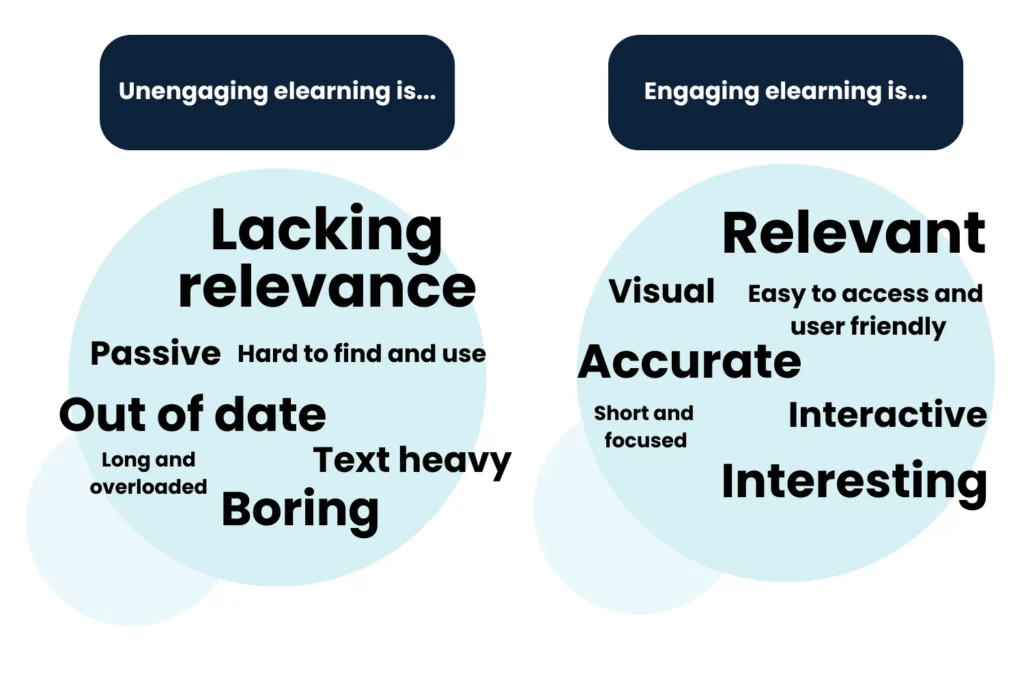
But with 60% of employees in large organizations rating their elearning as fair to poor, it’s clear that learners are unengaged more often than not. So, what needs to change? How can you create more learner-centric elearning?


From our research, we’ve identified 6 core elearning best practices that are critical to creating engaging elearning that boosts your impact and drives real change.

Targeting the learners’ needs
A foundational elearning best practice is designing around real learner needs. Making good use of your people’s time means delivering training that meets those needs head-on. Don’t jump straight into designing the solution. Start with the problem. What are your learners struggling with? What will truly make a difference in their day-to-day life? When training meets a real need, engagement follows.

Grabbing and keeping attention
Capturing attention early is a non-negotiable elearning best practice in today’s distraction-heavy environment. Modern learners are stretched thin. The average employee gets less than one hour per week to learn. So, every second counts. If learning content doesn’t connect fast, they move on. That means leading with the value. Don’t just tell them to just go and learn. Make it clear why your digital learning matters and why they need it now. Sell it to them.

Creating short, snappy content
We all know there’s no quicker way to disengage busy people than presenting them with a ton of dense information. Best practice in elearning design means less is more. Whatever content you’re starting with, you’ll always need to dial it back. Focus on what’s essential. And present it in a way that’s simple, clear, and easy to act on. The fewer learners need to wade through, the more they’ll retain.

Making it relevant
Relevance is one of the most critical engagement best practices. In a world where apps are serving up content based on people’s tastes and preferences, they expect the same from their digital learning. If elearning content feels generic or out of touch, they’ll switch off. Show them how the learning connects to their role, goals, and challenges. If something is really relevant and useful, it motivates learners to use it.

Encouraging application
Interactivity is important. Without the human interaction of the classroom, it’s crucial to get learners actively participating in their learning experience. But that doesn’t mean clicking on the screen for the sake of it. We all know that quickly becomes downright irritating. Interactivity happens in the brain, not with the mouse. Make every activity purposeful. If it doesn’t help them do something, it doesn’t belong.

Taking the learning into the workplace
Your learning experience shouldn’t end when they close the browser window. Drive real-world impact by ending your elearning on a strong note. Don’t leave your learners hanging. Finish with a call to action. Providing clear next steps is how learning leaves the screen and shows up on the job.
Want to dive deeper into these six elearning best practices of learner engagement? Sign up for our certified course on how to create engaging elearning.
8 learning strategies that deliver engaging elearning
The critical elements of engaging training programs can take many forms. Whether it’s diagnostic surveys and on-the-job resources or microlearning skills training and immersive simulations, you can combine approaches to maximize your learner engagement.
Here are some effective engagement strategies, alongside a few highlights from our best elearning examples to provide some immediate elearning inspiration.
1. Blended learning
Blended learning design isn’t new, but right now it’s more relevant than ever. For large, global organizations with dispersed teams and varied job roles, this learning strategy offers flexible and effective ways to support your people at scale.
With a learning blend, the possibilities are endless. Mix up how you deliver content – from elearning and face-to-face sessions to coaching, on-the-job tasks, social learning, and more. Combine formats to provide your learners with the right support, in the right way, and at the right time to drive performance and behavior change.

Blended onboarding example
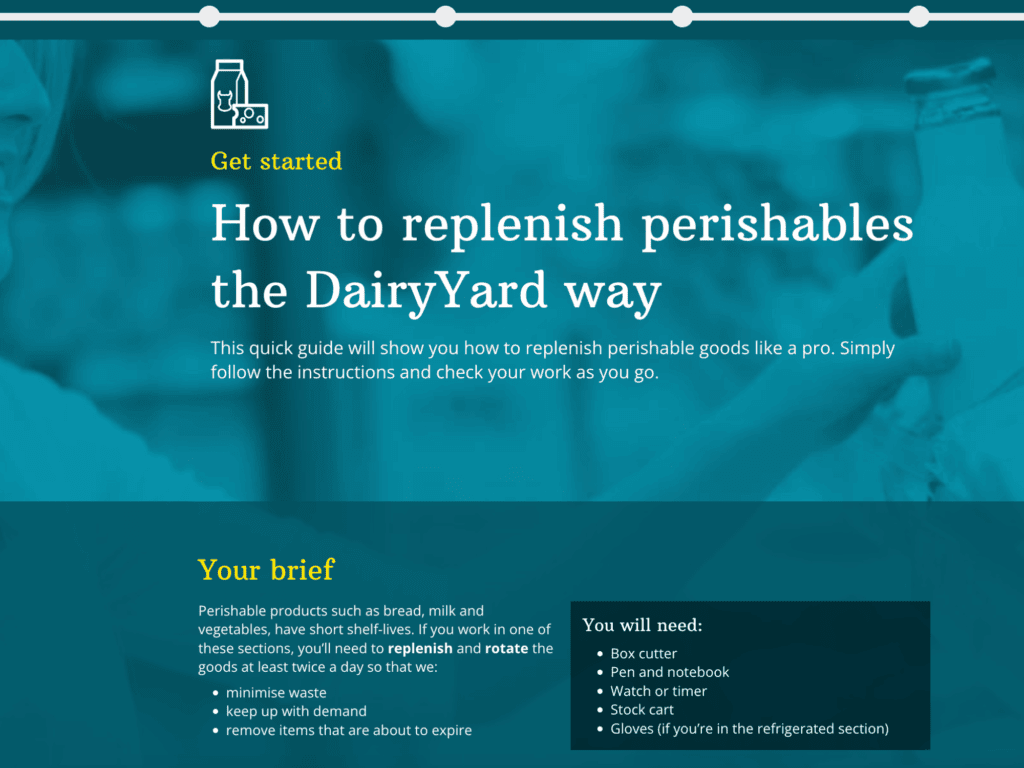
This quick guide example is designed to be part of a blended onboarding campaign for new starters. It uses an in-page progress menu to help learners orient themselves in the learning experience. The guide ends with real-world actions to take on the shop floor during their first shift.
Blended learning design top tips
Start with the outcome
Design backwards. What does ‘better’ look like on the job? How can you best support a shift towards this and help people make the change?
Reuse, remix, and adapt
Designing a blend doesn’t have to involve lots of planning. You can quickly pull together a blend by drawing on what you have. Don’t be scared to try things out. Remix and adapt your blend as you go.
Keep an eye on the time
Think about how long people will need to work through the blend. Some elements will be more flexible than others. Limit the face-to-face time to where it really counts: conversations and practice. A good blend supports performance without adding stress.
Think campaign, rather than course
Learning doesn’t have to be a long digital course or full workshop. Make sure each step in your blended learning journey is short, purposeful, and well-spaced. Keep people on track with quick manager chats, a nudge, or a quick reflection.
Want to find out more? Explore our blog on how to build an effective blended learning strategy.
2. Interactive and dynamic content
Interactive elearning is a dynamic and engaging way to create active participation in the learning process. It isn’t about just reading, watching, and clicking on buttons. It’s about getting immersed in learning by making people think and do.
Interactive elearning courses draw people in with a variety of elements, such as branched scenarios, interactive videos, and simulations. These approaches help learners to retain more knowledge and apply it faster, building confidence as they go.


Gamified simulation example
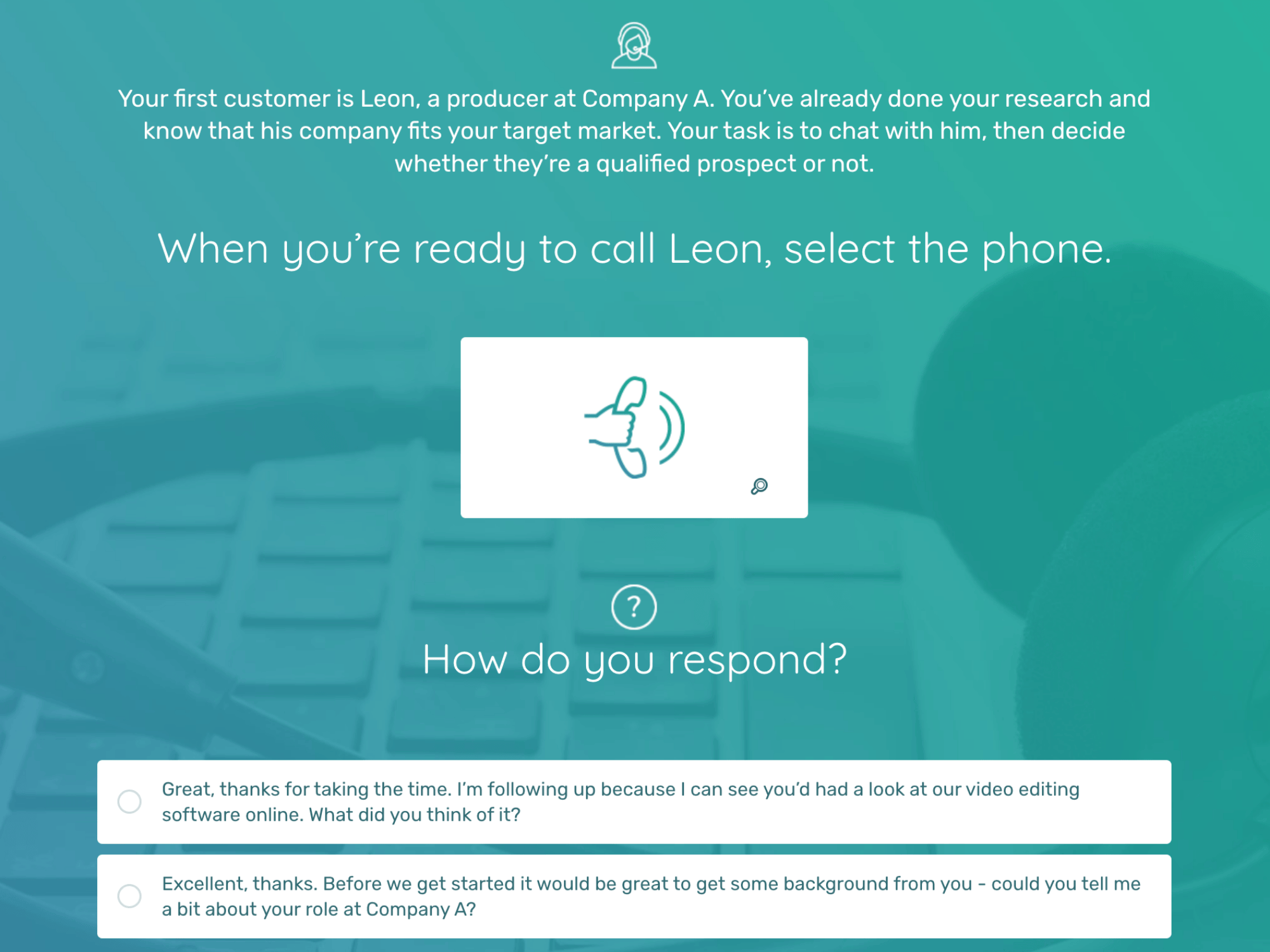
This audio-driven simulation helps salespeople learn by practicing in a simulated environment. It provides learners with realistic scenarios and interactive simulations to enhance their sales skills, knowledge, and decision-making abilities.
Adding game mechanics, such as points and timers, creates a sense of play and competition. It taps into the competitive nature of salespeople, motivating them to learn and improve.
Interactive and dynamic elearning design top tips
Know your audience
Take a closer look at the people who are going to take your course. Create learner profiles. An understanding of your target audience will help you identify what engagement looks like to them and how interactivity can achieve it.
Design with purpose
Make sure the interactivity you choose aligns with your learning objectives and resonates with your audience. Get this straight first and design the elearning interactivity to be in service of your people’s needs.
Use a variety of techniques
To create engaging content, it’s important to use a variety of media and techniques, including graphics, videos, audio, and interactive elements. including storytelling and real-world examples.
Create elearning gamification with impact
Don’t just add points to a task or tack a leaderboard onto an end-of-course quiz. If you’re adding game mechanics, they have to serve a purpose beyond “making it fun.”
Want to find out more? Explore our blogs on interactive learning and gamification.
3. Personalization
In a world where ‘one-size-fits-all’ no longer applies and advanced technology is ever-present, personalization has become essential. 38% of learners say they’re more engaged when training reflects their reality. That means addressing your learners’ individual context and goals, and providing content, tools, and experiences that work for them.
From upfront role selectors and customizable learning paths to tailored summaries and personalized action plans, you can tailor elearning experiences to meet the needs of all your learners.


Personalized learning example
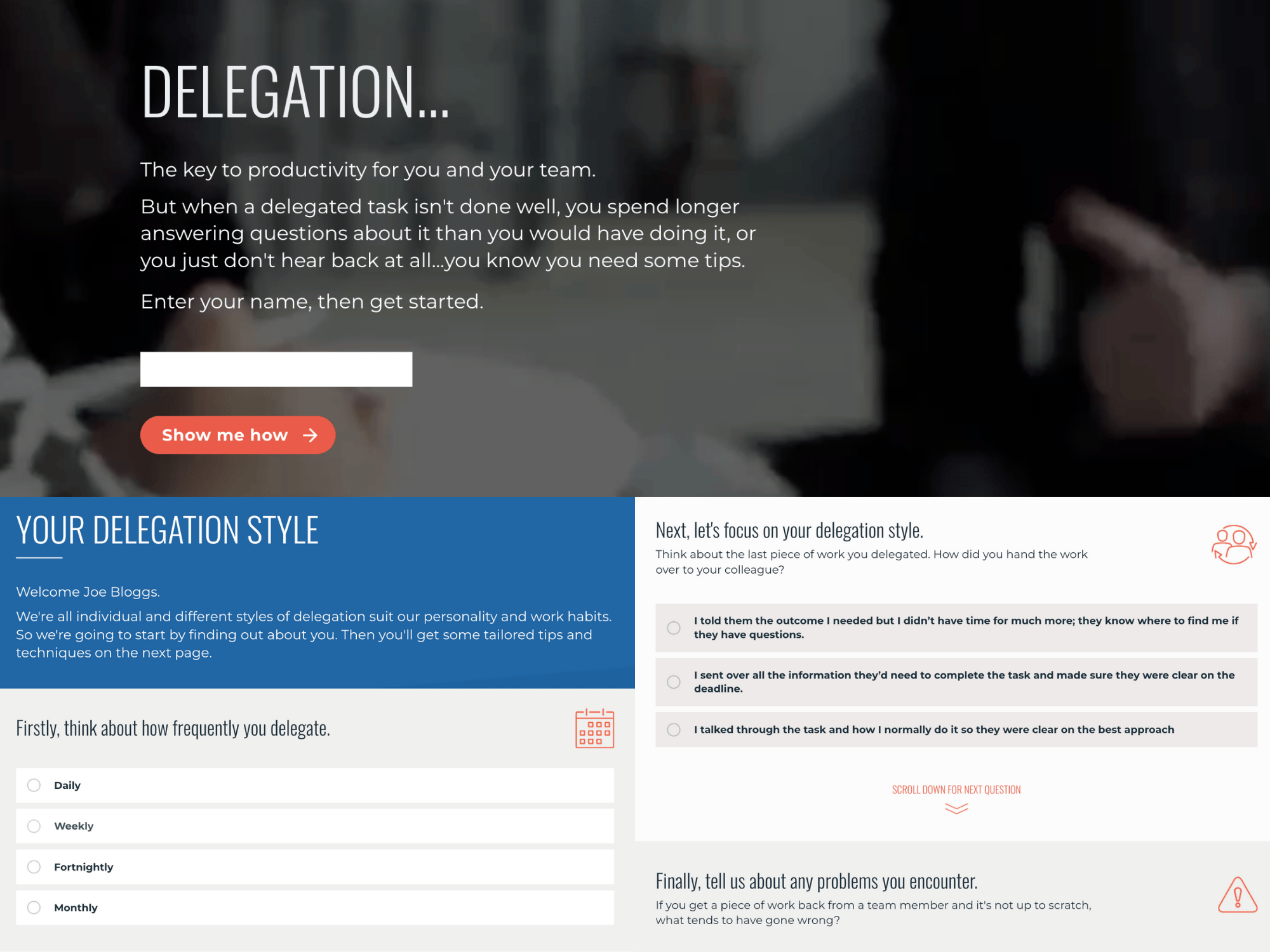
This adaptive learning example asks targeted multiple-choice questions to users about their current habits and struggles when delegating work. It then serves up a tailored report based on how they answered to help them see where they need to improve. It makes effective use of learners’ time by honing in on real gaps and providing targeted guidance on the next things they need to do.
Of course, this sophisticated diagnostic isn’t the only way to help learners find content that’s relevant. Smart menus that include reflective questions and give clear choices allow people to tailor their learning experience.
Personalized learning design top tips
Start with a chance to reflect
Asking your learners to reflect on their current experiences is a great way to engage people and get personal at the beginning of your learning experience.
Include examples
To make sure you design elearning that’s overtly relevant to your audience, provide context. Don’t just tell learners what to do; include real-life examples of how these skills are applied in their day-to-day work. This might require different versions of content or the use of personalization tools to help filter out what’s relevant to that audience member.
Provide role or skill specific content
Try a simple “role filter” at the beginning of your learning content, and then use dynamic menus or branching to serve up the topics or pages that apply to that role. If you’re providing training on a specific skill, ask your learners what context they need to apply the skill. Armed with their answers, you can provide the specific examples or application exercises they need.
Localize your content
Translation can really help engage global audiences, but localization provides truly relevant learning. This is where someone from that location helps edit the written and visual content to bring it in line with local “norms” and contexts.
Want to find out more? Explore our blog on how to create personalized elearning.
4. Microlearning
Microlearning is a way of providing short, focused pieces of content to an audience. Of course, bite-sized courses don’t necessarily equal good learning. It all comes down to execution. The best microlearning utilizes pockets of time effectively, not overloading the learner with information but building competence and confidence over time.
This microlearning approach can take various different shapes – from standalone job aides to multiple resources that are part of a cohesive learning journey or campaign.


On-the-job resource example
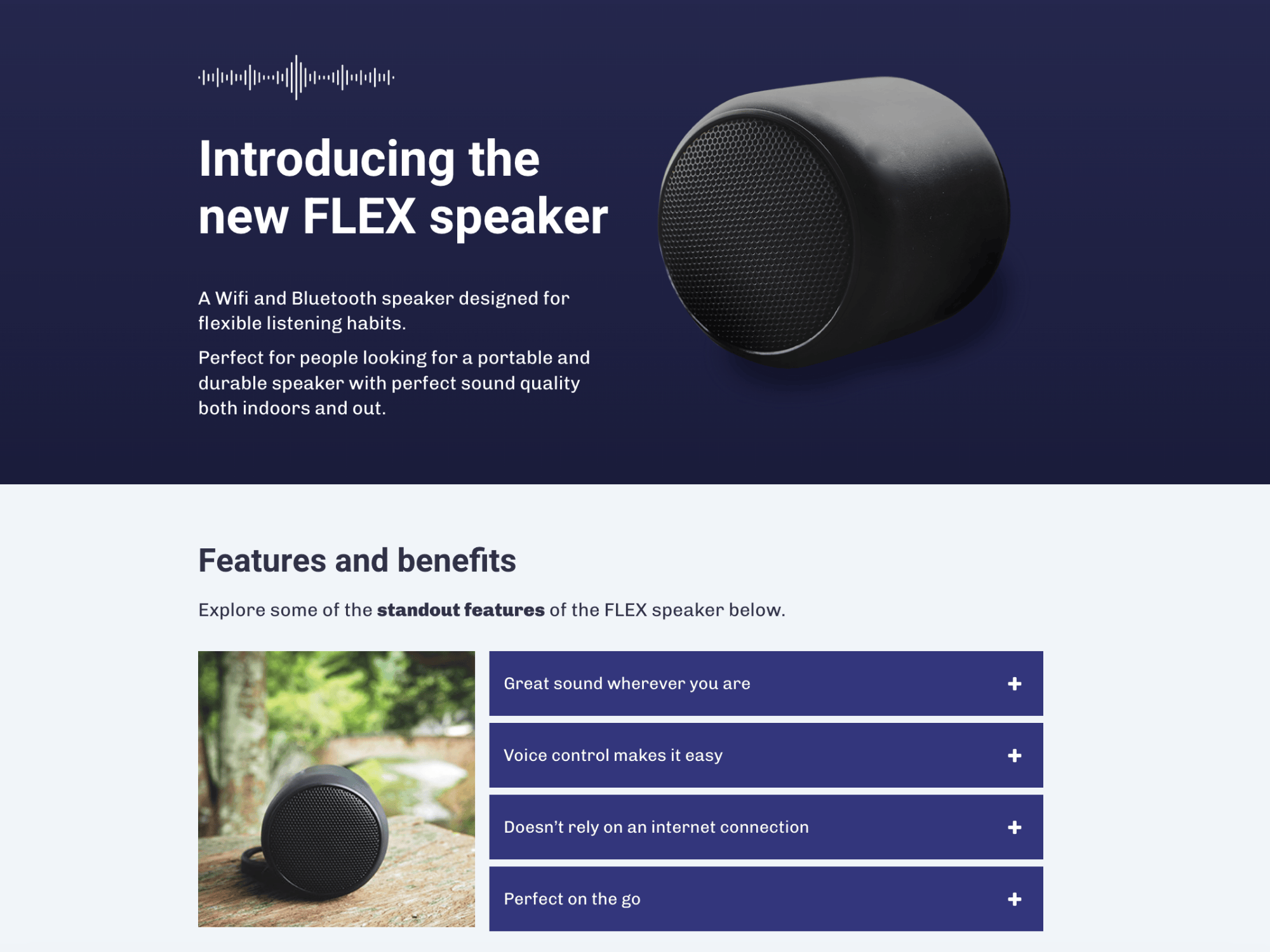
Access to microlearning resources, which employees can use at the point of need, has an immediate impact on performance. This product knowledge example supports self-paced learning on the shop floor. It’s short and focused. Learners can use it – as and when needed, to explore the product catalog or check a quick detail while with a customer.
Microlearning design top tips
Be the answer to a specific problem
Google is so popular because it helps you find just what you’re looking for. Microlearning needs to do the same. But your answer can be better, as it can reflect your workplace and audience context.
Create clusters
Avoid producing microlearning nuggets blindly. Know how each topic fits into overarching performance goals and connects with other content. Is it a performance support resource, part of an incremental skill-building program, or both?
Create spaced practice
Providing learners with regular challenges that enable them to apply skills in slightly new situations helps grow competence and build memory. String together microlearning challenges into learning journeys that get harder or easier depending on performance.
Remember your learning design principles
Just because you’re producing something short doesn’t mean it should be dry or just “info.” Stories, examples, demos, challenges, expert tips, and job aides should all be considered.
Want to find out more? Explore our microlearning guide or these handy tips to make your microlearning strategy really deliver.
5. Scenario-based learning
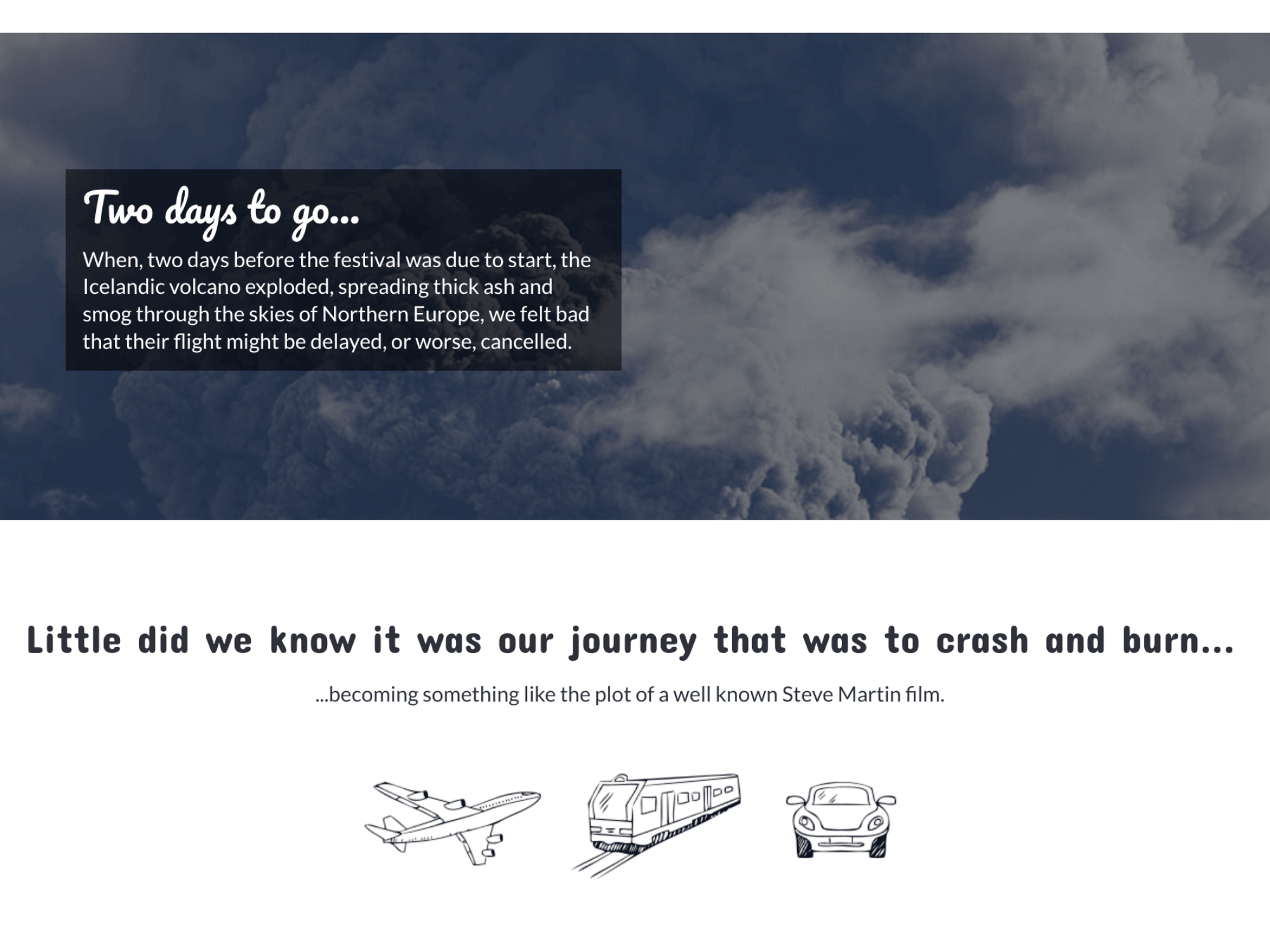
Scenario based learning puts users in the driver’s seat and is a great way of increasing their engagement with a digital learning experience. “Choose your own adventure”-style scenarios like the example below immerse users in a story and allow them to make decisions that control the outcome.
This approach allows users to learn through experiencing consequences rather than being informed of them. In particular, it enables people to learn from (safely) making mistakes.

Branching scenario example
Storytelling is an incredibly powerful force for learning and memory. It has been part of what humans do since the beginning of time. When done right, it has the ability to immerse learners in a scenario, strike up emotions, and connect with people, which are both crucial to engaging their hearts as well as their minds.
Storytelling doesn’t always need video or audio. This example contains a simple soundtrack to add context, but it doesn’t have to. It’s a subtly interactive scenario that asks users to make some choices for themselves partway through. Great for the start of a wider performance change campaign.
Scenario-based learning design top tips
Find the human side of your content
Whether it’s the story of an overstretched parent whose relationship with his children improved when he made some changes to his day (time management training), or the trials of a young manager who felt overlooked and shut down by her superiors (diversity and inclusion training), people and their experiences will make your content compelling.
Show, don’t tell
When you’ve uncovered the emotion, let it take center stage in your scenario, and trust your learners to work out what’s going on. Write dialogue rather than learning points, focus on feelings, and describe senses rather than stating facts.
Provide multiple perspectives
Our natural curiosity doesn’t just apply to one character in a story. Often, we’re intrigued by how our opinion differs from others.
Want to find out more? Explore our guide to scenario-based learning.
Not sure why stories and learning are a winning combination? Check out these ideas and tips for storytelling in elearning and this immersive storytelling article for inspiration.
6. Multimedia content
In a world where distractions are everywhere, studies show that multimedia learning content can cut through the noise.
Effective use of media in digital learning creates a reaction. It’s not just about watching or listening; it’s about connecting, understanding, and applying knowledge. There isn’t one right way to deliver multimedia content. But by using a well-chosen and arranged combination of content and interactions, you can produce learning with impact.
Video-based scenario example
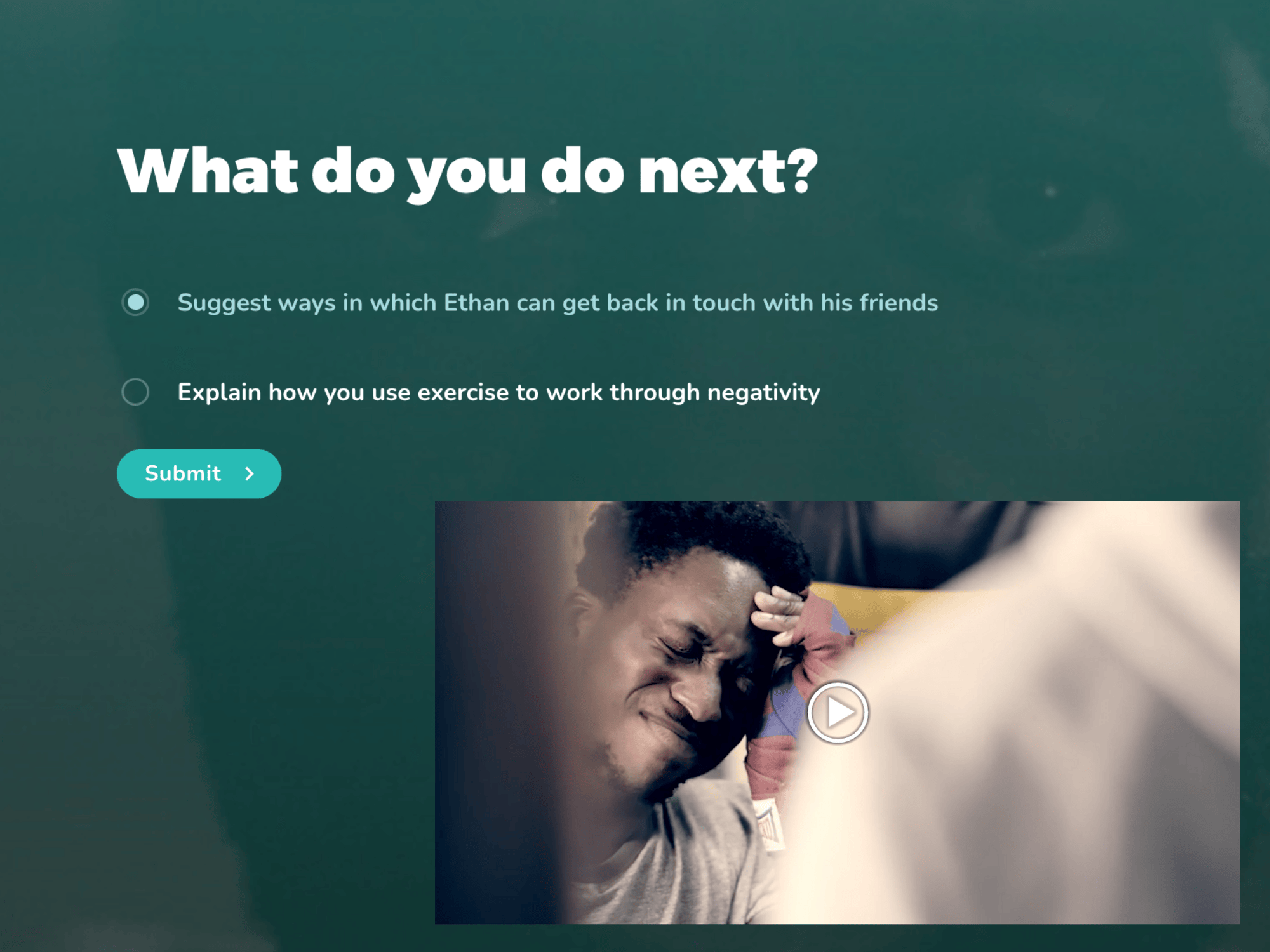
This video branching scenario, based around mental health issues, immerses learners in a scenario and connects hearts and heads. Interactive videos draw them into the story, and they’re asked to make a call on what they think is going on and what action someone should take. This emotional connection is vital for effective learning to take place.
The personalized results at the end analyze the approach the user took, compare it with others’, and set out how other options would have played out.
Multimedia learning design top tips
Don’t splash the cash unless you really need to
Check if the perfect video already exists on YouTube or other platforms, and embed it. Explore whether audio (cheaper and easier to produce than video) could create the same impact.
Make it personal
Capture personal stories when interviewing people, not corporate messaging. Do a few takes, each time helping your subject drill down to the essence of their story.
Experiment with selfie videos
Get people to record videos on their smartphones and upload them for you to use within or to complement your elearning.
Simplify the complex
Audio can help bring complicated content to life. Use it to walk through diagrams and conceptual graphics.
Check out more advice in this micro guide to using audio and video in elearning.
7. Social learning
Digital learning may be convenient, but it can also feel isolating. One of the key benefits of face-to-face training is the sharing of knowledge and experience with colleagues.
This collaborative learning can also happen online. You can use digital spaces to enable learners to share and discuss ideas. Build lasting social learning connections using the communication channels your business already has available. Add elements of social learning to your digital courses by including social polls or creating a blend with elearning and face-to-face touchpoints, such as feedback loops.


Social polling example
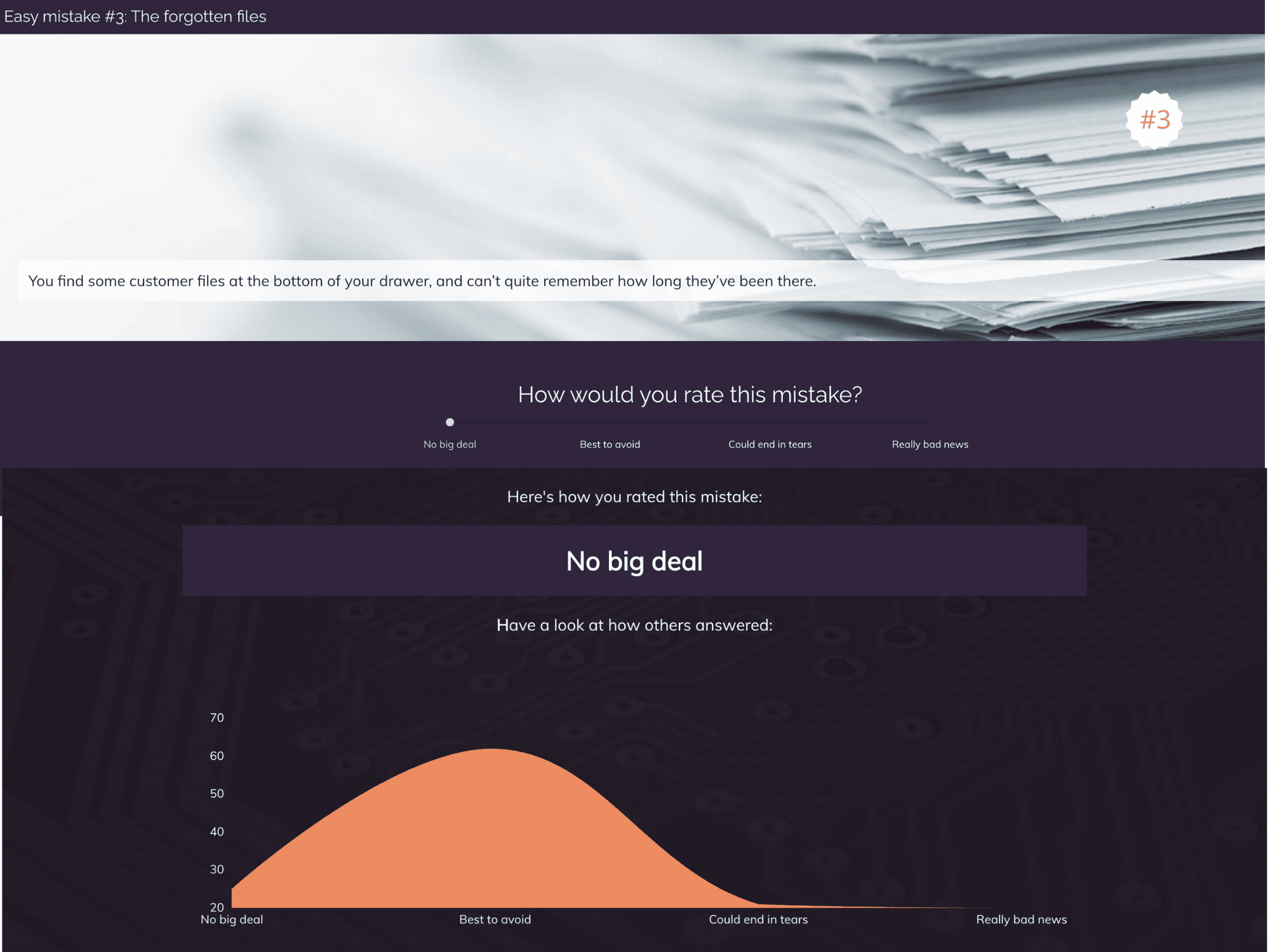
Getting people to reflect on their mistakes is an effective and memorable way of encouraging compliant behaviors.
This social polling example asks learners to judge real situations and uses social polls to compare their views with others.Including social polling appeals to people’s natural curiosity as they can compare their own responses to those of their peers.
Social learning design top tips
Leverage FOMO
Use social polling so learners can see how they compare to their peers. Fear of missing out on being part of the gang will help motivate people to change their behavior.
Support informal social learning
Keep the conversation going after course completion by encouraging sharing between colleagues. For example:
- Regular online group catch0-ups to discuss tasks, challenges and their progress through the blend.
- Discussions on intranet forums.
- Peer support over Slack, Teams, or check-in calls.
Create social challenges
Regularly set challenges within intranet forums or over social channels, encourage continuous learning, and the sharing of ideas with peers.
8. Mobile learning
Everyone should be able to have a great learning experience. With employees accessing elearning anytime, anywhere, and on any device, delivering quality responsive learning experiences on smaller screens is critical.
And if you want to ensure your digital learning is truly inclusive, it also means making sure you consider accessibility from the start. Accessible learning is effective learning. Design for mobile. Think inclusively. Make sure every learner, regardless of device or ability, has a seamless experience.
Mobile learning example
This quick briefing example shows how a short interactive resource could be used for just-in-time support.
The simple structure (What, Why, How, and What’s next) can be quickly scanned through on any device. It enables people to easily access the information they’re after in the moment of need.

Mobile learning design top tips
Embrace the scroll
Design your user interface so it’s a natural fit with the device and mimics how people explore other online content. Long pages and fewer clicks are best.
Make it bite-sized
Design for the amount of time your users are likely to stay on their phone. Our data, based on millions of learners, shows the average session time on mobiles is 10 minutes.
Reduce the number of clicks
Focus on one action at a time, removing unnecessary screens or clicks.
Make it thumb-friendly
Ensure content can be easily accessed with thumbs, and buttons and links are big enough and spaced out.
Make it easy to scan
The fast-scroll is inevitable, so make sure your key points will stand out. Use clear headers, numbered points, and icons to grab attention.
Declutter
Remove any images or sections that won’t work on smaller screens or just clutter up the experience.
This article contains the low-down on mobile learning design best practice.
Best tools for engaging elearning
Whichever approach you choose to take to enhance your learners’ engagement, you need the right tool for the task.
Here are 3 elearning platforms trusted by enterprise L&D teams to deliver learning with impact:
Elucidat
Helps teams to create impactful elearning quickly and easily by unlocking expertise from any employee. With Elucidat, you can empower anyone of any skill level to create digital learning ready for any device. It offers a range of ready-to-use templates and interactive features, including quizzes, games, and simulations.
Adobe Captivate
Gives experienced authors the power to create high-quality content. Built for responsive design and advanced functionality. As one of the original tools on the market, you can create some pretty impressive elearning content with this tool. Although its complexity comes with a much steeper learning curve and authoring challenges.
Articulate 360
Ideal for individual users who prefer PowerPoint, with an added layer of customization. Due to its hefty learning curve, Storyline is usually left to the more experienced author and PowerPoint wiz. Great for polished course interactivity, it offers a range of prebuilt lesson types, custom learning interactions, and screencasts to create a range of courses.
Read a full comparison in our review of the top elearning authoring tools.
Common mistakes to avoid
With the right authoring tool and the right learning approach, you can maximize your impact with elearning that truly engages people. However, to achieve this, you’ll need to avoid some common mistakes.
Skipping learner research

Create solutions that overtly meet the specific performance needs of individuals in their context.

Take a one-size-fits-all or a “top down” approach to learning.
How do you avoid this?
Start with clear learning objectives and user profiles: It goes without saying that unless you know what problem you’re trying to fix, why it exists, and what the audience needs, your elearning project is unlikely to be effective.
Speak to them: Is your tone of voice speaking to the target audience(s)? Is it at the right level? Is it helping turn theory into actionable outcomes? Is it contextualized?
Give choices: Design your solution to support employees to make choices that are right for them. Do they need the 5-minute overview or the 15-minute deep dive? Do they want activities they can do themselves, or case study exercises to do in a group?
Too little interactivity or too much interactivity
Create content and experiences that connects with audiences, motivates them to do something, and engages by getting learners involved.
Create online manuals with no interaction. But equally, don’t introduce clicking on the screen for the sake of it.
How do you avoid this?
Create learner participation: Active learning and practice are the building blocks of effective or “sticky” learning. Encourage action and participation inside and outside your elearning. Reflecting, trying, practicing, being stretched, failing, discussing, comparing (in person or online via social polling) is the kind of interactivity that engages through involvement.
Tell stories: Great digital storytelling and immersive learning experiences connect hearts and heads. It creates an emotional connection, which is vital for effective learning to take place.
Make endings the beginning: Embed links to relevant next steps to create a continuous learning engagement. For example, discussion forums, further learning, practice tasks, and on-the-job guides.
Information overload
Use people’s time wisely, making learning short and to the point, and allowing people to dip in and out.
Create a splatter gun of disconnected pieces; just information without any support.
How do you avoid this?
Less is always more: Reading on screen is hard work, and there’s only so much detail someone can take in at a time. Say what you need to say in the shortest way possible.
Make it scannable: Use clear headers, subheadings, emboldened sentences, bullets and more to help make the copy more scannable and digestible.
Get visual: An image is worth a thousand words. From diagrams to photographs, the right visuals can increase your impact. Take a visual learning approach to communicate your key concepts quickly, engage your learners, and even get an emotional response.
Spaced repetition and practice: Rather than asking learners to sit through a two-hour-long course, which they’ll likely forget in a few weeks’ time, break learning into short chunks that have purpose. This allows you to build up learner competence and confidence incrementally across a period of time through spaced repetition.
Ignoring accessibility
Create content that’s easy to access and use when people want it, wherever they are, whatever their ability.
Create content that’s hidden in long courses, behind complex menus or systems, and that isn’t compatible with assistive technologies.
How do you avoid this?
Think about assistive tech from the start: Make your content compatible with assistive technologies (e.g., screen readers) by adding captions, providing a transcript, and choosing your language wisely.
Think about readability: Color contrast is key to readability of text. Ensure that contrast is high, either by using very different tones or very different colors. Consider boosting your text size to improve legibility.
Consider your interactions: Certain interaction types are not fully accessible for all learners. For instance, some drag-and-drop and sortable activities rely on a learner using (and being adept with) a mouse, which will exclude anyone using keyboard navigation.
How to measure engagement in elearning
Once you’ve designed your engaging digital learning experience and uploaded it to your Learning Management System (LMS), you can start measuring your success.
One of the big benefits of digital learning is that data dashboards can help identify how you’re meeting your goals. The key is to balance data about users with information about performance by tracking engagement and measuring impact.
Gauge learner engagement
Most L&D teams measure some key data points, such as completion rates, time spent learning, assessment results, and feedback scores. It’s a great start, but it’s not the full picture of your learner engagement.
Explore the range of analytics your authoring tool offers. For example:
- Most visited topics: Which topics within your elearning are most popular. This could indicate your audience is actively looking for support in certain areas.
- Interaction and click rates: Are there some interactions that people skip over, and others they engage with in greater numbers? This could indicate the types of interactivity your audience prefers.
- Common incorrect answers: Which questions your audience is getting right, and which are tripping them up. This could indicate knowledge gaps that impact performance.
- Popularity in audience groups: Which countries/departments/locations are engaging most with the elearning. This could indicate where you need to do another round of promotion.
Measure performance impact
Next, measure the impact your training has had on the business. Here are three steps to help you identify your course’s impact on Key Performance Indicators (KPIs):
- Review your goal and the business metric you plan to impact. Identify a benchmark to measure against.
- When you’ve reached significant engagement levels with your elearning, measure your key metric again and compare it to your benchmark.
- Use what you’ve learned from your engagement data. For example, if you’ve seen more engagement and more improvement in the US compared to the UK, get UK managers involved in promoting the elearning again.
Use data to sharpen your impact
Tracking is only useful if it leads to action. Armed with data, you can learn, improve, and update your training. You can also take forward any learning into your next project to improve engagement. Use insights to improve what’s not working. Spot where learners drop off. Find what sticks. Then tweak and tailor to keep improving performance.
Summary
Effective elearning is about more than slick presentation. It’s about behavior change. Engaged learners are motivated to learn and improve their performance in the workplace. With that in mind, best practices for designing engaging elearning all come down to your learners and their behaviors too.
Find out what your learners need
All elearning – in fact, all training – should be aiming to improve performance or solve a problem within the business. It goes without saying that unless you know what problem you’re trying to fix, you’re unlikely to be able to fix it. So, every elearning project should start with understanding your audience, their learning styles, and training goals.
Put our 6 elements of engaging elearning into practice
- Target your learners’ needs to ensure the training is relevant and addresses real challenges.
- Grab and keep their attention by showing immediate value and importance.
- Create short, snappy content, focusing only on what’s essential to engage learners and deliver change.
- Make sure it’s relevant to your learners’ roles and goals.
- Encourage application with purposeful interactivity, not just clicks.
- Take the learning into the workplace by ending with a strong call to act
Identify the right learning approach for your engagement strategy
- Blended learning combines different formats – like elearning, in-person sessions, and coaching – into a learning journey that can support diverse learners at scale.
- Interactive and dynamic content engages learners by making them think and act, for example, through scenarios, simulations, and immersive experiences.
- Personalization tailors content and learning paths to individual roles, needs, and goals, to deliver truly relevant training.
- Microlearning delivers short, focused content in manageable chunks that build skills and confidence over time.
- Scenario-based learning helps learners make decisions in realistic situations, encouraging reflection, critical thinking, and safe exploration of consequences.
- Multimedia content enhances engagement and understanding through effective use of visuals, video, audio, and interactive elements.
- Social learning creates opportunities for peer learning even in digital environments.
- Mobile learning ensures learning is accessible anytime, anywhere, and for everyone, with content designed for small screens and inclusive usability.
Make sure you choose an authoring tool that can really deliver your learning strategy to maximize your learner engagement.
Measure your impact and improve learner engagement
Once people have completed your digital learning, measure its impact. Start with learner engagement metrics before looking at performance impact. With this information, you can learn, improve, and update your training to deliver engaging elearning.
We can help you do it!
Elucidat is the collaborative tool your team needs to produce learning that excites and engages your audience.
Guided workflows and ready-made, expert-designed templates make it easy for anyone to produce engaging digital learning at speed.
Enhanced collaboration features make the review process seamless, allowing you to maintain high standards. Empowering you and your colleagues in the L&D team to expand content production and capture expertise, all while increasing learning quality!
With these best practices in mind, you can create impactful elearning! Book a demo today!